
MODEL INSTRUCTIONS
Nano V1 Jack kit instructions
Choose the battery steps for your Nano or Nano Pro neckloop, connect the 3.5 mm source and run the tabletop audio check. Both versions use passive magnetic Nano receivers.
Before you start
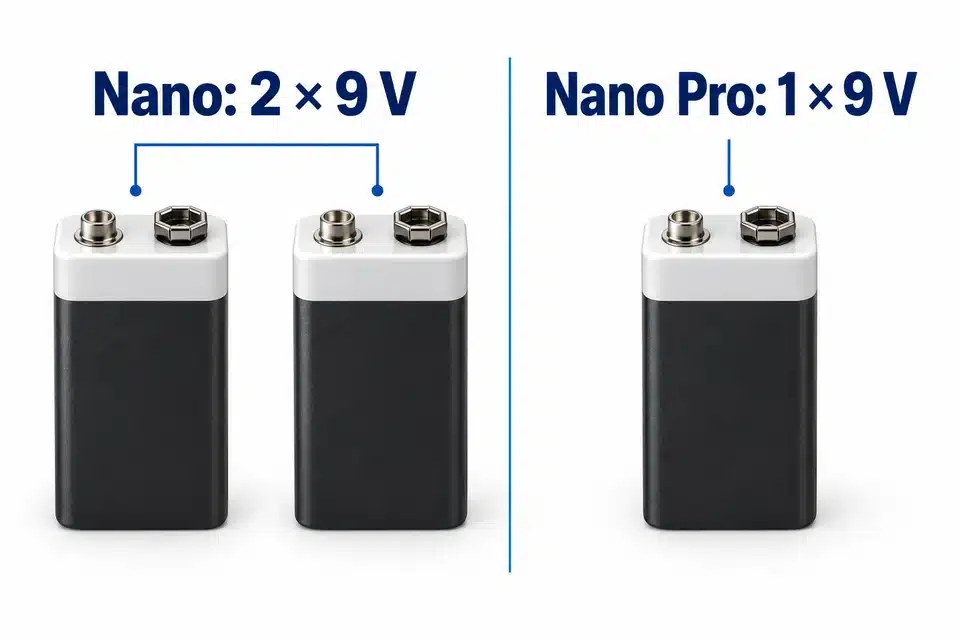
Nano neckloop: two 9 V batteries. Nano Pro: one 9 V battery and an ON/OFF switch. Nano receivers themselves contain no cell.
Check the selected neckloop and battery count before plugging in a phone or player.
1. Check your parts
Check the model and selected neckloop option against your order. Keep the two small Nano earpieces separate from the larger extraction magnet: they are different parts.
- Two magnetic Nano earpieces.
- An extraction magnet and extraction rod.
- The selected Nano or Nano Pro induction neckloop.
- A compatible phone or audio player with a 3.5 mm socket, or an adapter that supports the audio and microphone functions needed.
- Nano neckloop: two 9V batteries. Nano Pro neckloop: one 9V battery. These 9V batteries are supplied separately.
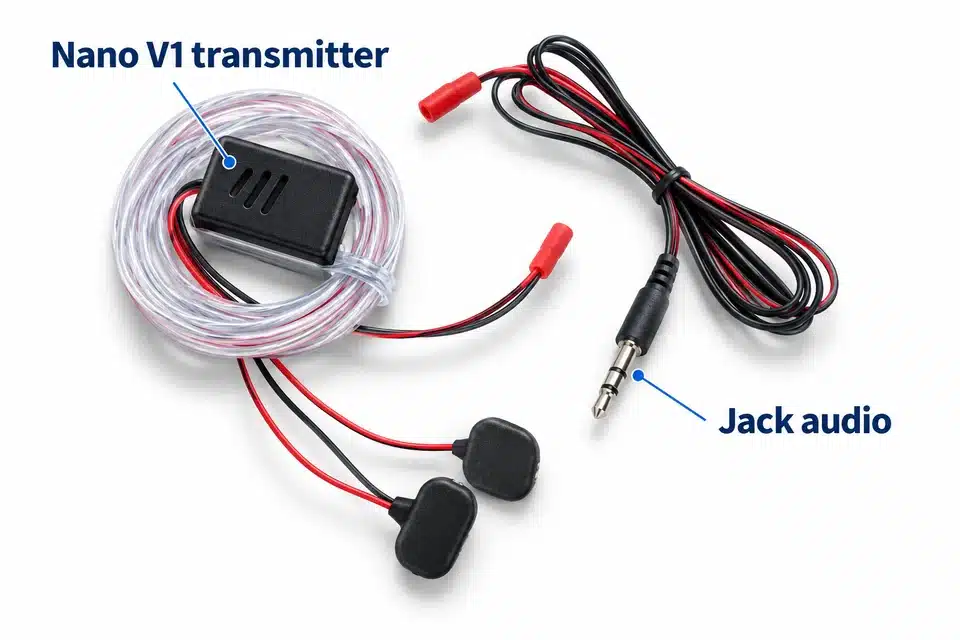
The Nano neckloop has separate transmitter and receiver parts joined by red connectors, plus the 3.5 mm lead and microphone. The Nano Pro neckloop has a protective battery case and an ON/OFF switch.The earpieces themselves have no charging connection. Power is supplied to the neckloop.
2. Nano neckloop: connect its two parts and batteries
Join the transmitter and receiver
Match the red connectors by their shape. Check that the red wire aligns with red and the black wire with black.Connect two 9V batteries
Fit one 9V battery to each battery connector. Align each battery terminal with its opposite connector so that it fits correctly.Disconnect the batteries between uses
This Nano neckloop continues to consume power while the batteries are connected. Disconnect them when you finish; release the connectors without pulling on the wires.
3. Nano Pro neckloop: fit its battery and switch it on
Fit one 9V battery
Slide open the protective case. Align the battery terminals with the opposite connector and press them together until the connector clicks into place.The gap under the battery in the case is part of its design; a secure connector is the important check.Use the ON/OFF switch
The switch is on the back of the battery case. Slide it to ON after fitting the battery. This model does not show a power light. Slide it to OFF after use.
4. Connect a phone or audio player
Check the socket
Remove the phone case if it prevents the jack from fitting fully. Check that the socket is unobstructed.Connect the 3.5 mm lead
Connect the kit to the headphone socket on your phone or player.Check any adapter separately
If the phone needs an adapter, confirm that it supports phone-call audio and the microphone connection, as well as playback. Some third-party adapters or phone combinations may play music but fail during calls.
If calls fail through an adapter, try an adapter from the phone manufacturer or another compatible phone before changing other kit components.
5. Test the kit before use
Carry out this audio test on a table in a quiet room before placing an earpiece in the ear.
Power and connect the neckloop
For Nano, check both red connectors and both batteries. For Nano Pro, check the single battery and set the switch to ON.Identify the test pieces
Place the extraction magnet together with the two small Nano earpieces. The extraction magnet is not an earpiece.Place the pieces against the neckloop
Lay the test pieces in direct contact with the neckloop. Start a song or audio file on the connected source and check its audio output and volume.Check for a response
This test checks for vibration or a very quiet sound from the pieces. A response confirms that this bench audio path is operating; it does not confirm earpiece placement in the ear.
If there is no response, check battery charge and connections, the Nano Pro switch, the jack/adapter and the source audio. Try another compatible phone or player. Use the checks below if the result does not change.
6. Position the kit and use its controls
Earpiece placement and removal
The supplied extraction rod accepts the separate magnet at its base. Identify these tools and the two small Nano earpieces before use. If fit or removal is unclear, stop and ask for model-specific guidance. Do not use sound alone to decide that a receiver has left the ear.
Position the induction neckloop
Wear the neckloop around the neck. Keep the source device and the batteries or battery case supported so that they do not pull on the connections.The neckloop is flexible, but it is not washable. Keep it away from water and protect its connectors.
Use the microphone and button
The microphone is behind the button assembly. Keep it clear of clothing or tape.
| Action | Function | Limit |
|---|---|---|
| One click | Answer/end a call, or play/pause an audio file. | Phone and app support varies. |
| Two clicks | Next audio file. | May not work with every phone, adapter or app. |
You can also control calls and playback directly from the phone. Use a player app that supports the headset-button functions you need.
7. After use
- Nano: disconnect both 9V batteries. Release the connectors without pulling their wires.
- Nano Pro: set the case switch to OFF.
- Clean the loose Nano earpieces, extraction magnet and rod before and after use. The kit instructions list water or isopropyl alcohol for these loose parts only, outside the ear. Keep these cleaning liquids away from the neckloop, batteries and electrical connections.
- Keep the powered neckloop and connectors dry. Do not wash the neckloop.
Fix a failed check
No audio or vibration in the bench test
For Nano, check the red transmitter/receiver connectors and both batteries. For Nano Pro, check the battery connection and ON/OFF switch. Test with charged batteries, then check the source volume, silent mode, jack fit and adapter. Try another compatible source.The bench test responds, but the worn kit is quiet
Check that the induction neckloop is around the neck, the batteries have charge and the source is sending audio through the correct output. If the issue concerns earpiece placement, stop and ask for model-specific help rather than pushing it deeper or using another object.Only one earpiece produces audible sound
First identify the two small earpieces and avoid confusing either with the extraction magnet. Check the complete kit on the table. A worn-volume difference alone does not establish an earpiece fault; describe the bench result to support.Music plays, but phone calls do not
Check that the adapter supports phone-call audio and microphone use. Confirm the phone’s call-audio output, try the manufacturer’s adapter where applicable, or test another phone.The multifunction button does not respond
Phone, adapter and app support varies. Try controlling the call or audio file directly from the phone, then test with another compatible device or playback app.The microphone does not work
Check that it is not covered, restart the phone and check its audio routing. Test the microphone with the phone’s voice-memo or recorder app, then a phone call. Test another compatible phone if needed.I cannot remove the earpiece
Do not infer that the earpiece has fallen out merely because there is no sound. Stop repeated attempts and seek medical help if removal is difficult. Contact CooMax for the model and supplied extraction-tool information.The neckloop worked previously and has stopped
Check whether Nano batteries were left connected or the Nano Pro switch was left ON. Replace discharged batteries, confirm the connections and repeat the table test. If the batteries have charge, follow the no-audio checks.9. Help with Nano V1
Tell us whether you have the Nano or Nano Pro neckloop, your phone/player and adapter, the battery count, and the result of the table test. Include your order number if you already bought the kit.
Care and safety
Do not push a receiver deeper or put tools or cotton buds into the ear canal. If removal is difficult, stop repeated attempts and get medical help. Severe pain, bleeding or discharge needs urgent care; a battery in the ear needs immediate help.
Mayo Clinic: ear foreign-object guidance · NHS: earwax advice
Keep power parts dry and follow the model-specific storage and charging steps above. If equipment is damaged, stop using it and contact model support.
Get model-specific help
Tell us whether you have the Nano or Nano Pro Jack neckloop, your phone/player and adapter, and the tabletop audio result. Include both 9 V battery connections for Nano, or the single battery and ON/OFF switch for Nano Pro, and whether playback, a call or the microphone first failed.
Choose another model’s instructions