
MODEL INSTRUCTIONS
Vip Pro GSM induction card instructions
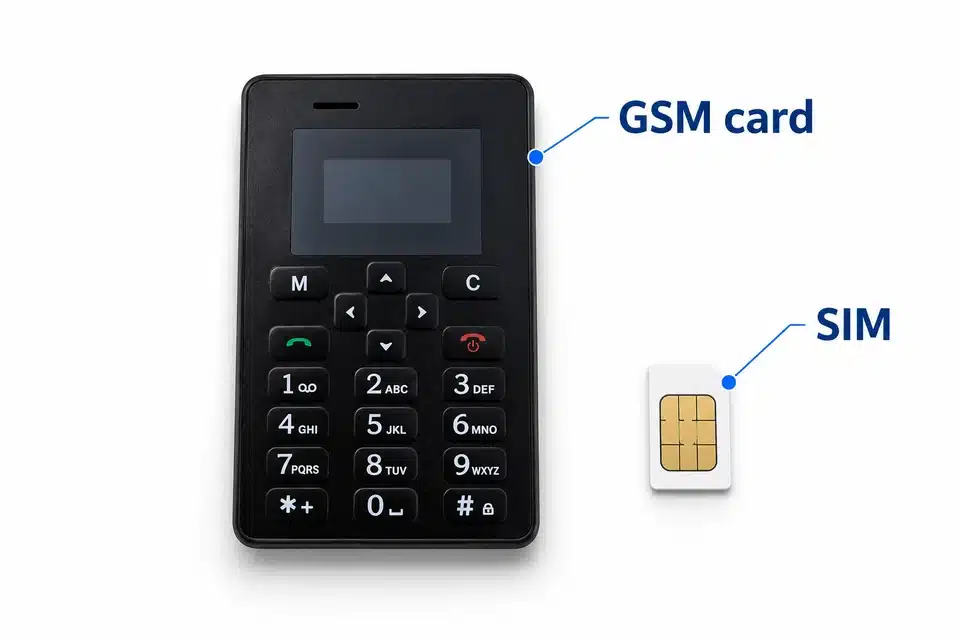
Prepare a working Nano SIM, switch on the card and check a call before use. The card receives the call itself; a phone is used to prepare the SIM and call its number.
Before you start
| Control or state | What it does |
|---|---|
| Audio path | SIM voice call → GSM induction card → selected induction Vip receiver. |
| Microphone | Inside the card. The keypad/card functions are separate from receiver power. |
| Listed power | Rechargeable card and separate 337/SR416SW receiver cell; listed use time up to 3 hours, depending on use. |
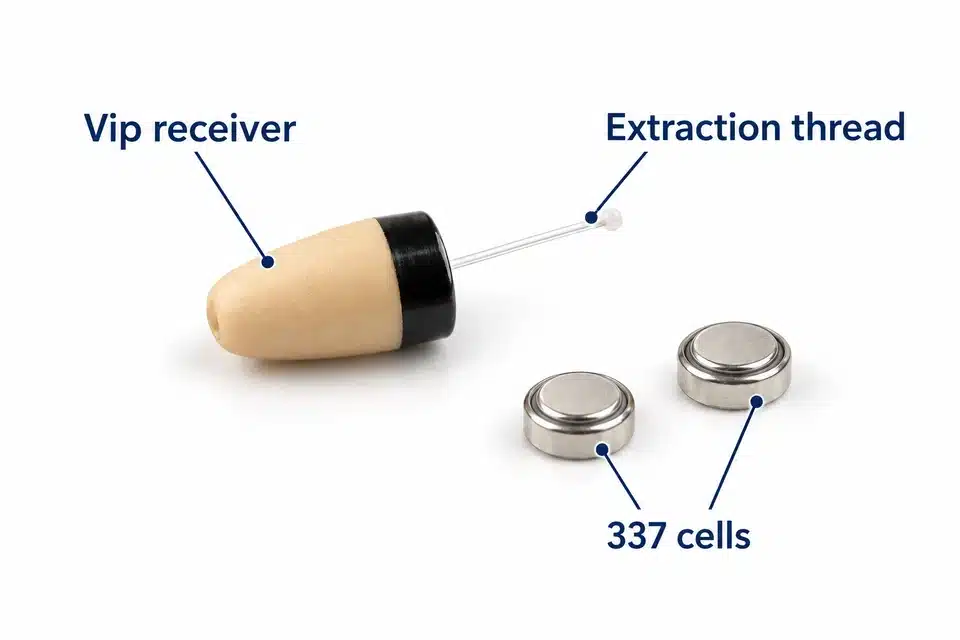
| Listed kit | GSM card, selected Vip receiver, two 337/SR416SW cells, USB cable and EU charger. A working SIM service is needed. |
Check the chosen option and your order’s contents before using or replacing parts. Optional bundles are included only when selected.
Disable the SIM PIN in a phone, fit the SIM correctly and check registration before the call test.
A successful call with the SIM in a phone checks the SIM service; it does not confirm this GSM transmitter. Before buying or using it in the UK or USA, ask CooMax to confirm the exact hardware version and radio bands, then ask your operator to confirm voice service for that device. Do not assume that the unit supports LTE voice calling. If this version depends on 2G GSM, do not rely on it where that network has been retired. T-Mobile announced 3 August 2026 as its scheduled US 2G GSM retirement date, and UK operators also have 2G closure plans.
1. Fit the selected receiver cell
- Check that your selected Vip receiver uses a 337/SR416SW cell. MegaMini uses LIR640 and has a separate guide.
- Unscrew the black receiver cap. Fit one cell with the positive, marked side facing up, then refit the cap straight.
- Fit the cell shortly before use. It drains while fitted, even when no audio is playing; remove it after use.
2. Inspect the receiver and plan safe removal
Inspect the receiver outside the ear. Background hiss can occur with an induction receiver; it does not prove that playback or calls work. Test the actual audio path.
Keep the sound opening clear. If it is blocked, ask model support about cleaning; do not probe it with a needle or alter the internal spring.
Do not force a receiver deeper. Keep its retrieval thread accessible and stop if fit or removal is not easy.
3. Prepare and fit the Nano SIM
- Test the SIM in a phone: it must receive voice calls at the intended location.
- Temporarily disable the SIM PIN in the phone’s security/privacy settings. If unsure, consult instructions for that phone.
- Fit the Nano SIM in the card’s slot using its marked orientation. It is seated when it clicks; push inward until it clicks to release it.
4. Switch on without changing factory call settings
- Move the switch to RET, the position nearest the charging port. The display should show Welcome. Charge for at least 1 hour if it does not start.
- Keep the factory automatic-answer settings unless model support tells you to change them.
- Use the arrows to navigate, M for menu and C to cancel/exit. The green phone key makes a call; the red phone key ends a call or controls power. The keypad has 0–9, * and #.
- Move the switch to OFF to switch off.
5. Check a call in the worn position
- Keep the induction card between your neck and chest. Secure it so it does not move, without obstructing the unit.
- Call the fitted SIM from another phone and check automatic answering and receiver sound.
- The microphone is inside the card. Adjust its distance from the receiver gradually: closer is louder, farther is quieter. Do not position it so close that audio is audible outside the ear.
6. Charge the card and finish use
- Use the supplied cable with a supply no higher than 5 V / 1 A. A battery icon appears while charging.
- Listed charging time is about 1 hour and listed operating time about 3 hours, depending on use.
- Switch off the card, remove the receiver safely and remove the receiver cell.
- End the call or stop playback, then switch off or disconnect the transmitter as described for this model.
- Use an accessible retrieval thread with your fingers only. If removal is difficult, stop repeated attempts and get medical help.
- Once the receiver is safely out, unscrew its cap and remove the cell. Store the receiver and cell separately.
Fix a failed check
The SIM does not receive a call
Check PIN removal, Nano SIM seating/click, charge and a successful voice call with that SIM in a phone. Try an area with coverage or a SIM from another operator.
The call connects but receiver audio is low
Check the selected receiver cell, positive-side orientation and straight cap. A cell left fitted can be flat even if the kit has not been used.
Test the audio source and the transmitter’s position separately. Restart the source/transmitter and try a known-working cell or another phone when the same check still fails.
Start with low volume. If the receiver makes a loud noise outside the ear, remove the cell and check orientation and cap alignment. Do not bend the internal spring; contact support if it persists.
Keep the card between neck and chest. Restart it, call again and compare receiver distance gradually; closer increases volume.
The caller cannot hear the microphone
Restart the card, check call volume on the other phone and make a separate test with another phone. Do not change factory settings simply to troubleshoot receiver volume.
Receiver removal is difficult
Use the accessible retrieval thread with your fingers only. Stop if it is not easy to remove; do not keep trying with tweezers or other tools. Get medical help for a retained object, and immediate help for a battery in the ear.
Care and safety
Do not push a receiver deeper or put tools or cotton buds into the ear canal. If removal is difficult, stop repeated attempts and get medical help. Severe pain, bleeding or discharge needs urgent care; a battery in the ear needs immediate help.
Mayo Clinic: ear foreign-object guidance · NHS: earwax advice
Keep the device, cables and adapters dry. If they get wet, unplug safely and allow them to dry fully; do not use an external heat source such as a hairdryer or microwave.
Stop using damaged equipment. Use the supplied or specified power parts, keep cables/adapters indoors and do not handle connected equipment during a thunderstorm.
Use is discouraged with a pacemaker, hearing aid, other electronic medical device or a hearing condition. Seek suitable professional advice before use in those circumstances.
Follow local rules for use, privacy and disposal. This product is not a toy. Ask CooMax for the documentation and warranty terms that apply to your selected product and country.
Get model-specific help
Tell us your selected Vip receiver, the GSM card's RET/Welcome display result and whether its Nano SIM receives a voice call in a phone at your location. Include the card charge, separate 337/SR416SW cell check and first failed call or microphone test. Keep SIM PINs private.
Choose another model’s instructions